
Royal Envelope
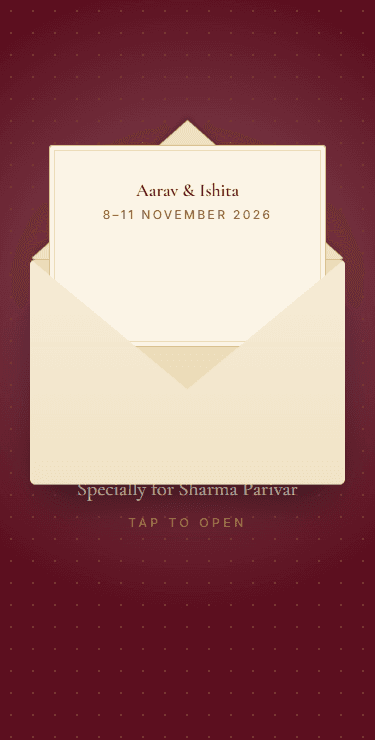
A maroon envelope sealed with wax that opens to a gold-trimmed card.
English · हिन्दी
शुभ विवाह
Pick a design, add your names, events and photos — ready in about 10 minutes. Guests open a link on WhatsApp, see their family's name, get directions to every function and save the dates. No app, no login.
English & हिन्दी · Works on every phone · Every feature free
Choose an animated template — palace gates, a mandap, a royal decree, glowing diyas, a baraat and more — and a colour theme.
Names, families, every function with its venue and dress code, photos and music. See it live as you type.
Send each family their personal link on WhatsApp and see in your dashboard who has opened it.
Each preview plays the real opening — tap one to try it in a phone.
A maroon envelope sealed with wax that opens to a gold-trimmed card.

A watercolour gate-fold card that opens to a floral wreath and drifting petals.

Bold type and clean lines — a date cover that lifts away to an editorial layout.

Carved palace doors swing open, light floods in, and every section waits under its own arch.

Pillars rise, a canopy drops and garlands swing in — then the whole invite plays inside the mandap.

A silk ribbon unties, a parchment unrolls and your invitation inks in, line by line.

Light one diya in the dark and watch the glow spread, row after row, to your names.

Beat the dhol and the procession sets off: an elephant, the groom's mare and the band walk you to every event.

A rangoli draws itself from the centre out and fills with colour, then your invitation turns like the pages of a book.

A henna cone traces a paisley medallion around your names, the colour deepens as it dries, and vines grow down the page as guests scroll.

Temple bells ring out, a kolam joins its dots, and your celebrations stack up like banana-leaf cards.

Velvet curtains part and two string puppets take a bow; every celebration is a new act on the stage.

A bold black frame draws itself, peacock and fish fill with colour, and your wedding unfolds panel by panel like a folk-art comic.

Your names assemble from scattered letters and the date rolls in like an odometer. Bold, modern, all about the type.

Polaroids drop and pin onto a corkboard, one flips to show the date, and guests can move your photos around the board.

Stars join into a constellation of your initials, a crescent moon rises, and the moon waxes full as guests travel through your celebrations.

Watercolour washes spread across the paper and flowers grow around your names, then your invitation flips open like a painted sketchbook.

A frosted-glass arch rises to reveal your photo in a sweep of light; your details follow on stacked glass cards.

A gold scratch card: guests scratch with a finger to uncover your date, then confetti. Perfect for a save-the-date.

Paint splashes burst across the screen and your names stamp into the colour: a loud, messy, joyful haldi.

Paper lanterns drift up into the night; release one to reveal your names, and every celebration rises into view on a lantern of its own.

A record slides out of its sleeve and the needle drops as your music starts; your celebrations are the tracklist, Side A and Side B.

Paper feeds into a typewriter and your invitation types itself, then the letter keeps typing as guests read on.

Bright and playful — tap the sun for a burst of marigolds, then stickers and tickets.
Each family gets a personal link that greets them by name and shows only the functions they're invited to.
Know which families have opened their personal link, function by function, and nudge the rest on WhatsApp in one tap.
A day-before reminder with the map and dress code, and a morning-of message for every family invited.
Directions to every venue in one tap, and add-to-calendar for each function so nobody misses the baraat.
Every template works in Hindi with proper Devanagari lettering — perfect for elders.
Envelopes, palace doors, parchment scrolls and diyas that open on tap, with music that plays only when your guest wants it.
No card, no trial, no catch — just make your invite.
No. Guests open a normal link — on WhatsApp, SMS or anywhere — and the invite plays right in their phone's browser. It is built to load quickly even on slow connections.
Yes. Edit names, events, venues or photos any time and everyone sees the update on the same link. The link itself only changes if you rename it.
Yes. Every template supports Hindi with proper Devanagari lettering, and you can switch between English and Hindi in the editor.
Yes. Your dashboard shows which families have opened their personal link, so you know exactly who to nudge on WhatsApp.
Your invite stays live until 60 days after your last function. After that it becomes a read-only keepsake you can still open and share.
Music comes from Nimantran's royalty-free library, so it's safe to use. It never plays by itself — only after your guest taps to open the invite, and they can mute it.
Guest numbers are only visible to you. They never appear on the invite, are never used for marketing, and invite pages are hidden from search engines.
Yes. During our launch every template and feature — personal guest links, reminders and QR codes — is free, with no card needed.